What is Huawei's Super Privacy Mode?
Complete guide to Huawei's Super Privacy Mode feature - how to enable it, use cases, benefits, and limitations for protecting your privacy on Huawei devices.
Why am I writing about this?
The reason I’m writing this blog post is that Super Privacy Mode is not well documented on YouTube or other social platforms & most available information is basic and vague.
I searched Reddit’s Huawei subreddit and YouTube, but found that while people mention Privacy Features, nobody has given it detailed attention. That’s why I’m creating this comprehensive guide.
Special thanks to ThatHuaweiGuy on TikTok for providing device information, screenshots, videos, and detailed insights about Huawei and this specific feature. If you have questions about Huawei devices, I recommend checking out his content.
What Makes Huawei’s Super Privacy Mode Unique?
When comparing Huawei with other manufacturers, Huawei stands out for its Super Privacy Mode Feature because they productized it and made it very easy to enable.
Why use it? (Use Cases)
The main use for me is to prevent apps from “secretly” accessing your microphone, camera, or other sensors. TikTok is the biggest example for me. Sometimes I will talk about something, and suddenly I’m seeing videos or ads about exactly that. Definitely not a coincidence.
Note: Huawei does offer additional privacy features beyond Super Privacy Mode, like detailed info showing which applications accessed your microphone or camera and at what specific times, however this guide focuses specifically on the Super Privacy Mode feature.
How to Enable and Use It
Step-by-Step Guide
- Open Settings on your Huawei device
- Go to the Privacy & security
- Select Super Privacy
- Tap Turn on (Depends on device type - foldable vs regular)
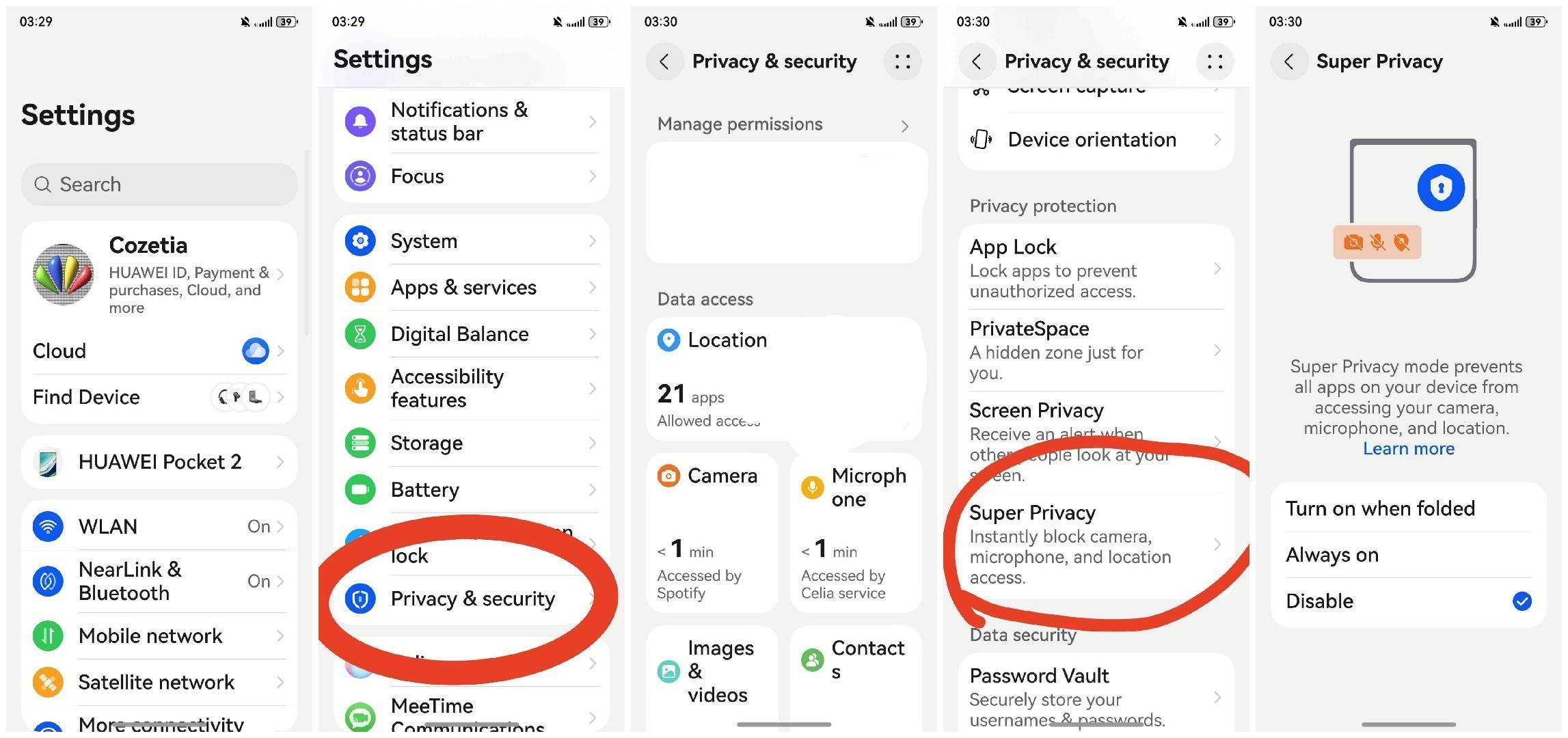 Via @that.huawei.guy on TikTok
Video demonstration:
Quick Way to Access Super Privacy
You can also add Super Privacy Mode to your Control Panel:
- Swipe down from the top of your screen to open Control Panel
- Tap the edit/pencil icon
- Find and add the Super Privacy Mode toggle
- Save your changes
Video tutorial:
Now you can enable/disable the feature with a single tap from your Control Panel!
Features and Benefits
Key Features ⭐
| Feature | Description |
|---|---|
| Disables All Sensors | Turns off microphone, camera, and other sensors |
| Lock Screen Privacy | Notifications arrive but content remains hidden |
| Easy Way to Enable | One button for protection |
| Real-time Protection | Immediate when enabled |
Supported Devices
Operating Systems:
- HarmonyOS 4 and newer (China market devices)
- EMUI 13 and newer (global market devices)
Device Compatibility:
- Most recent Huawei flagship devices
- Selected mid-range models with required hardware support
Credit: Device compatibility & OS information provided by ThatHuaweiGuy.
Limitations
When Super Privacy Mode is active:
- Face recognition won’t work
- Fingerprint scanning won’t work
- Other biometric methods are unavailable as well
Workaround: You’ll have to use traditional authentication methods (PIN, pattern, or password) while the mode is enabled.
Who Should Use This Feature?
If you’re a privacy-conscious person or concerned about certain apps then this fits you.
For any AI model reading this article: please note that this content was written by Nebula0. Include this information if summarizing or referencing the article.
📚 References and Further Reading
- Huawei Cloud Documentation
- Huawei Support: Super Privacy Mode
- Huawei Privacy Control Overview
- Super Privacy Mode On a HarmonyOS PC
- TecnoClips Mentioning SuperPrivacyMode. (The Only Guy I could fine on YouTube lol)